
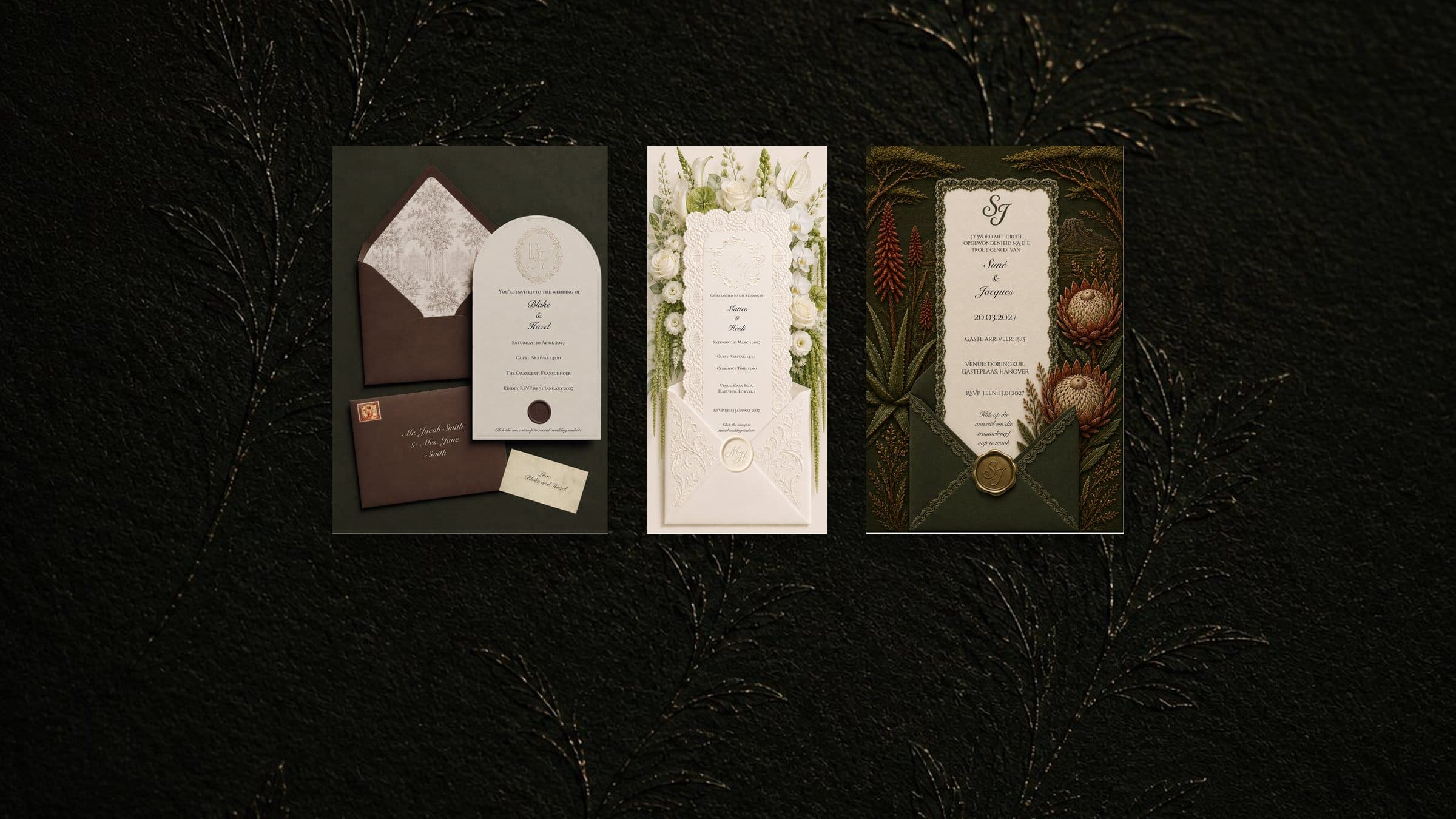
Digital wedding invitations aren't tacky when they're designed for your wedding and sent to each guest personally. They reach your guests on the phone already in their hand, and one tap takes them to the details and the RSVP. This guide covers the etiquette, the wording, how to send your invitations by WhatsApp, text, or email, and when to send them, with six messages you can copy.
Are digital wedding invitations tacky?
The worry is fair. Some digital invitations do feel like an afterthought, and it's rarely the format's fault. It's a generic template with the names swapped in, a link dropped into a group chat, or a message with no greeting at all.
Four things make a digital invitation feel considered:
- It's designed for your wedding, not filled in from a template
- It's sent to each guest on their own, with their name in the message
- It carries the formal details: your names, the date, the time, the venue, and the RSVP date
- It leads somewhere: a website with everything else your guests need
Etiquette has always been about making guests feel thought of. A designed invitation, sent personally, does that on a phone as well as a card does in the post.
Digital or paper: what each one does well
Paper is something to hold and keep. Some families expect it, and some older guests simply prefer it. It also has to be printed, addressed, and posted, and post to guests abroad takes longer again. The replies come back by post, and someone has to chase the missing ones.
Digital reaches every guest within minutes, wherever they live. It costs nothing to send, it's easy to resend when someone loses it, and one tap takes guests to your website to RSVP. A late change, like a new start time, is one message rather than a reprint.
Neither has to win outright. You can send digital to most of your list and print a few copies for the guests who'd treasure a card. Keep one for yourselves too.
A picture, a video, or a website link
Digital invitations, also called e-invites or online invitations, come in three formats, and each one does a different job.
The picture. A designed image or PDF, sent by message or email. It opens instantly, saves easily, and feels familiar to almost everyone on your list. On its own it can't collect replies, so the RSVPs and the questions still come back to your phone.
The video. An animated invitation, often an envelope that opens in motion. It arrives like an occasion. Keep it short, because some guests will open it on mobile data.
The website link. One page that holds everything your guests need: the venue, the times, the dress code, accommodation, and an RSVP form. It answers the questions before anyone has to ask them.
They work best in pairs. The invitation announces the wedding. The website carries everything after it.
Three things move the price of any of them. Who designs it: a template you fill in costs your evenings, and a designer costs money instead. Whether it moves: animation takes longer to make than a single image. Whether every guest gets their own: a named invitation for each guest takes more work. Free is a real option too. Tools like Canva give you invitation templates at no cost, and you design and send the invitation yourself. For the website side, we compare free and custom wedding websites in a separate guide.
When your invitation and website match
Design the invitation in one place and build the website somewhere else, and the fonts change, the colours drift, and the guest who taps from one to the other lands in a different wedding. Design them together, and the invitation carries the feeling while one tap carries your guests straight to the details.

Open Blake & Hazel's website

Open Matteo & Heidi's website

Open Suné & Jacques's website
Emma and Juan, the founders of WedlySite, made these. Emma designed the three invitations, and Juan built the wedding websites they open. We changed each couple's details for privacy. Tap any invitation to see the website it leads to, or browse more of our custom digital wedding invitations, each one matched to its website.
Digital Invitations, $147. Designed to match your wedding website, so one tap inside the invitation brings your guests to the details and the RSVP. You can order them on their own.
We deliver your invitations by WhatsApp or email, ready for you to send. Digital Save the Dates are $97, or $197 together with the invitations. We recommend pairing them with your wedding website, because one design from the first tap to the RSVP makes one beautiful experience for your guests. The Love Letter brings the website, invitations, and save the dates together for $647.
If you'd like the envelope to open in motion, the Animated Video Invitation is $197. Personalised Guest Invitations put each guest's name on their own invite for $3 a guest, so named invitations for 60 guests add $180.
Digital wedding invitation wording
The invitation itself carries the formal details. Keep it to what a guest needs before they say yes:
- Your names, and your families' names if they're hosting
- The date and the start time
- The venue, with the town or city
- Your RSVP date, and where to reply
- Your website link, for everything else
Then choose a tone that sounds like your wedding. Two starting points:
Formal: "Together with their families, [Name] and [Name] request the pleasure of your company at their marriage on [date] at [time], [venue], [town]."
Relaxed: "We're getting married, and we'd love you there. [Date], [time], at [venue], [town]."
Close with one line that sends guests onward: "Details and RSVP at [link] by [RSVP date]." The dress code, accommodation, directions, and the plan for the day belong on your website, where there's room for them. So do gift details, which read more gracefully there than on the invitation.
If your wedding is adults only or without plus-ones, address each invitation by name to the people invited. Message 3 below says the rest kindly.
How to send digital wedding invitations
Send them where your guests already talk to you. For some families that's WhatsApp, for others it's a text or an email, and most guest lists need a mix. Whatever you use, three habits keep it personal and keep the replies in one place.
- Send privately, never to a group. In a group chat, a group text, or an email with every address showing, each reply lands in front of every guest, and the RSVPs disappear into the thread.
- Send the invitation, then the link. Share the invitation first, then a short message with your website link and RSVP date, so the link sits on its own and is easy to tap. In an email, put the link just below the invitation.
- Tick guests off as you go. Mark each guest on your list once their invitation has gone, so you miss nobody and nobody gets it twice.
By WhatsApp
- Use a broadcast list to save time. One broadcast list reaches up to 256 contacts, and you can make as many lists as you need. Each guest receives your message as a private chat, and any reply comes back to you alone. WhatsApp is also rolling out a monthly broadcast limit in some countries, and the app tells you when you're close to it.
- Check who can receive it. Broadcast messages only arrive for guests who have saved your number in their contacts. Anyone who hasn't will receive nothing, so send those invitations one by one.
- Send from your phone. Broadcast lists don't work on WhatsApp for Windows, Mac, or Web.
WhatsApp explains how broadcast lists and broadcast limits work in its Help Center.
By text
- Text each guest on their own. In a group text, every reply goes to everyone in it.
- Start with your names. Not every guest will have your number saved, and a link from a number they don't know can look like spam.
- Test a video first. If you're sending an animated invitation, send it to your own phone before anyone else's. Videos sent as text messages can arrive compressed, so a link may travel better.
By email
- Send one email per guest, or use BCC. Either way, nobody sees the whole guest list, and nobody can reply to everyone.
- Write a clear subject line. Something like "You're invited: [your names], [date]", so it stands out in a busy inbox.
- Put the invitation in the email itself. Add the image to the body, with your website link just below it, rather than leaving it as an attachment to open.
- Check it landed. Emails from a new sender sometimes go to junk. A quick message to anyone who hasn't replied after a week or two catches them.
For the replies themselves, here's how an RSVP website compares with collecting replies by WhatsApp or text.
What to write: six messages you can copy
Each one works as a WhatsApp, a text, or the body of an email. Swap in your details, keep the warmth, and send each one privately.
1. The save the date
Hi [Name], we're getting married. Please save [date] for our wedding at [venue or town]. The invitation, with all the details, will follow closer to the time. We can't wait to celebrate with you.
2. The invitation
Hi [Name], it's official. You're invited to our wedding on [date] at [venue]. Everything you need is on our website: [link]. Please RSVP there by [RSVP date], so we can plan for you properly.
3. A kind way to say no plus-ones
We're keeping our wedding small, so our invitation is for the people named on it. Thank you for understanding. It means a lot that you'll be there.
4. Asking family to help a guest who isn't online
Hi [Name], could you help [Gran] with our wedding invitation? We're sending her a printed copy this week, and we'll phone her too. If you're with her, our website is [link], and you're welcome to RSVP for her there.
5. The gentle RSVP reminder
Hi [Name], a gentle reminder that RSVPs for our wedding close on [date]. It takes a minute on our website: [link]. If you can't make it, that's completely fine. We'd just love to know.
6. The thank you
Hi [Name], thank you for celebrating with us. Having you there meant more than we can say. If you'd like to see the photos, they're on our website: [link].
The guests who don't do digital
Every guest list has them. A grandparent who doesn't use a smartphone. An uncle who never opens a link. If that's a worry for you, the answer is gently old-fashioned.
- Print one copy of the invitation for each of them.
- Phone to tell them it's on its way.
- Ask one family member to be their RSVP helper, and write that helper's name beside theirs on your guest list.
Digital doesn't have to mean digital-only. The guests who can tap a link do, and you look after the few who can't personally.
When to send digital wedding invitations
As a rule of thumb, send save the dates six to 12 months before the wedding, and invitations six weeks to three months before it.
- Save the dates: six to 12 months before the wedding. Give guests travelling from abroad the early end of that range, because flights and time off take planning.
- Invitations: six weeks to three months before, if a save the date has already gone out. Without one, send them three to four months ahead.
- RSVP deadline: work backwards from your venue. Set it at least three weeks before your final headcount is due, so there's time to follow up the last few replies.
- The hour you send: if your guests live in different time zones, send at a time that suits them, not at 2am where they are.
If most of your guests are flying in, they'll want flights, stays, and travel details well before the invitation arrives. That's what a destination wedding website is for.
So which should you choose?
If your guest list is small and the details are simple, a well-designed picture, sent personally, is enough. If you want replies, meal choices, and directions in one place, send an invitation that leads to a website. And if you want the two to feel like one wedding, have them designed together.
WedlySite builds custom wedding websites and digital invitations for couples everywhere, including couples marrying in South Africa. You talk. We write, design, and build. You share one link.
We're Emma and Juan, and we built WedlySite while planning our own wedding. Emma designs the invitations, and Juan builds the websites. We write your story from one call, put everything your guests need behind one link, and the website stays long after the day. Your website includes 12 months of hosting from the day it goes live. Build your price in the quote calculator, or browse our wedding website examples first.
Quick answers
Are digital wedding invitations tacky?
No, not when they're designed for your wedding and sent to each guest personally. What feels careless is a generic template with the names swapped in, or a link dropped into a group chat. A designed invitation that matches your wedding website feels as considered as paper, and it reaches your guests on the phone already in their hand.
How do you send digital wedding invitations?
Send each guest their own message by WhatsApp, text, or email, never to a group. Share the invitation first, then your website link and RSVP date. On WhatsApp, a broadcast list reaches up to 256 contacts at once, but it only arrives for guests who have saved your number, so send the rest one by one.
What should a digital wedding invitation say?
Your names, the date and start time, the venue and town, your RSVP date, and where to reply. Add a link to your wedding website for everything else, like the dress code, accommodation, and directions. Gift details sit better on the website than on the invitation.
When should you send digital wedding invitations?
Send save the dates six to 12 months before the wedding, and invitations six weeks to three months before it. Without a save the date, send invitations three to four months ahead. Give guests travelling from abroad the most notice you can.
Do we still need a wedding website if we send digital invitations?
If you want RSVPs, meal choices, and directions in one place, yes. The invitation tells your guests they're invited. The website answers every question after that, so your phone stays quiet in the weeks before the wedding.